Skip to content
AI Chief of Staff · Powered by ReMynd AI

Chief

Your AI Chief of Staff, powered by everything you've ever seen or said.

Kept perfectly private on your terms. Text it like you'd text your chief of staff.

Mac app · Text on iMessage & WhatsApp · iOS companion
9:41
C
Chief
Today 9:14 AM
iMessage
iMessage · WhatsApp
The status quo

Right now, you are the chief of staff.

You're the one holding every decision, every promise, every detail — in your head and 14 open tabs. It doesn't scale, and it doesn't survive a bad week.

Powered by everything you've seen or said

A chief of staff with your digital life record.

One quiet app that remembers your work, sits in on your calls, and answers from your own history — not the open web.

Rewind

Scrub back through your entire visual history and replay any moment — a demo, a doc, a whiteboard you closed weeks ago.

Search

OCR reads every frame, so you can find anything you ever saw on your Mac — an API key, a name, a pricing number.

Ask

Chat with an AI that answers from what you actually did — grounded in your work history, never the open internet.

Calls

Every call — catching up with family, a friend, anyone — is recorded, transcribed, and searchable. Never scramble for notes again.

Built for how you actually live

You can't remember everything.
Chief never forgets.

Conversations that matter

Never forget what someone told you.

A friend recommends a restaurant, your partner mentions a plan for Saturday — and by next week it's gone.

What restaurant did Mia recommend last month?
Mia said Nonna's on 5th — the carbonara was the best she'd had. Every conversation is searchable, verbatim.
Research trail

Retrace every tab on your way to a decision.

You found the perfect apartment listing last week and can't re-find it.

Find that apartment listing with the rooftop I saw last week.
Your browsing is woven into your timeline — search reconnects you to the exact page, not just the domain.
Decision recall

Remember why you made the call.

“Why did we pick this contractor / this couch / this school?” lives in a group chat from months ago.

Why did we choose this couch over the other one?
Past context is recoverable in seconds. Stop relitigating decisions you already made.
Trip planning

Watch your trip plan itself.

You've read the guides, watched the videos, and collected tips from friends — the flight's in three weeks and the plan is still 20 open tabs.

Turn everything I've saved about Lisbon into a day-by-day itinerary.
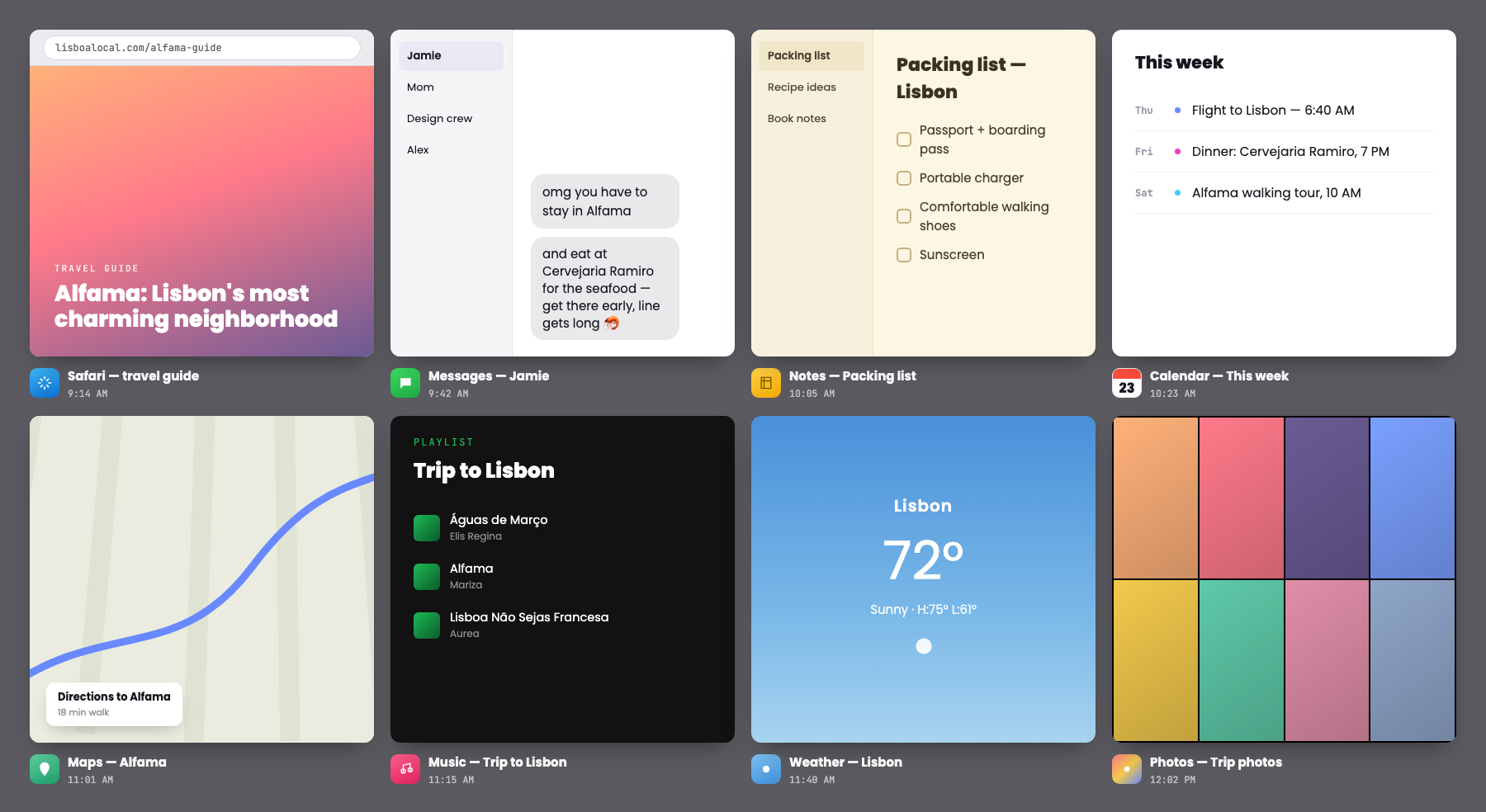
Day 2: Alfama walking tour, dinner at Cervejaria Ramiro — the place Jamie recommended. ReMyndAgent builds it from what you actually saved.
The daily loop

See where your day actually went.

The day blurs together, and by evening you can't remember what you actually did.

What did I actually get done today?
A Daily Overview threads your sessions automatically — honest visibility, zero manual logging.
Never lose an idea

Capture every idea before it disappears.

A podcast or video sparks a great idea, and by the next day the details are completely gone.

What was that idea from the podcast about habits?
Everything you've watched or listened to is searchable — the insight is still there, word for word.
Ask

Answers from your own work — not the web.

General AI has no idea what you did yesterday. ReMynd does. Ask it like you'd ask a chief of staff who saw everything you saw.
you › Draft a reply to Jamie about the Lisbon trip and the packing list I made this morning.
ReMynd — search your screen history
ReMynd search results: a grid of captured moments — Safari, Messages, Notes, Calendar, Maps, Music, Weather, and Photos — each with a timestamp
Calls

Every conversation, captured and searchable.

Zoom today; Slack Huddles, Google Meet, and Teams coming. Each call is transcribed and woven into the same timeline as your screen — so the answer remembers who said what.

you › What did everyone decide about Saturday's plans?
ReMyndAgent

Hire the chief of staff you can't afford yet.

Chief reasons across everything you've seen and said — then writes the report, builds the dashboard, or spins up a custom tool on your own data. Leverage without headcount.

The one thing a cloud meeting-notes tool can't do.
ReMyndAgent
4 sources · analyzing
Local-first by default

Private enough to remember your whole life.

You'd never let a cloud AI watch your messages, your browsing, your camera roll. That's the whole point — ReMynd keeps your memory on your machine.

On-device by default

Capture, OCR, and AI can run 100% locally — bring your own model with LM Studio. Nothing has to touch a server.

You own the bucket

Optional cloud backup is encrypted — and you can migrate it to your own S3 anytime. No lock-in, ever.

Never trained on, never sold

The agent's access is read-only and scoped through typed tools. You're the user — not the product.

On-device capture & OCR Encrypted cloud, your keys Bring your own LLM Own-your-S3 export
How Chief works

Install on your Mac. Text it from your phone.

ReMynd runs quietly on your computer and remembers everything you see and hear. Chief is how you reach that memory — from your phone, anytime.

01

Install ReMynd on your Mac

Download the Mac app and grant screen-recording once. It quietly captures everything you see and every call you take — all on your device.

02

It becomes your memory

Every doc, tab, and conversation turns into a private, searchable record of your work. Nothing leaves your machine unless you allow it.

03

Text Chief from your phone

Message Chief on iMessage or WhatsApp like a real chief of staff. It answers from your Mac's memory and handles the follow-through.

Pricing

Start for free. Pay only for storage you keep.

The app is free to download and run locally. Add encrypted cloud storage when you want your memory backed up and synced.

Download for Mac
Before you ask

The questions people actually have.

Does anything leave my Mac? +
By default, capture and OCR happen on-device, and you can run the AI locally with your own model via LM Studio. Cloud backup is optional, encrypted, and exportable to your own S3 bucket.
Can it capture my Zoom and Slack calls? +
Zoom call recording and transcription ship today. Slack Huddles, Google Meet, and Microsoft Teams are in progress. Calls are woven into the same searchable timeline as your screen.
What about sensitive stuff, like passwords or financial info? +
It stays on your machine. The agent's access is read-only and scoped through typed tools rather than arbitrary file access, and nothing is ever used to train a model or sold.
Do I need to connect integrations? +
No. ReMynd records what's already on your screen, so there's nothing to wire up. Install it, grant screen-recording permission once, and keep working.
Will it fill up my disk? +
You set retention and disk-usage limits, get warnings before you hit them, and can trim older local recordings with one click.
Is it Mac only? +
The recorder is a Mac app, with Chrome / Safari / Firefox extensions and an iOS companion. Capture happens on your Mac.

Meet your Chief of Staff.

Download Chief free and never lose the thread again.

Download for Mac
Free to download · Runs locally · No card required